How to track your card payments in PawLoop
Every card payment your clients make is listed in PawLoop, so you can see what has come in without opening anything else. This guide explains what each part of the Card payments tab tells you.
Open the Card payments tab
Go to Money, Online Payments. Once you are set up, Card payments is the first tab and the page opens on it.
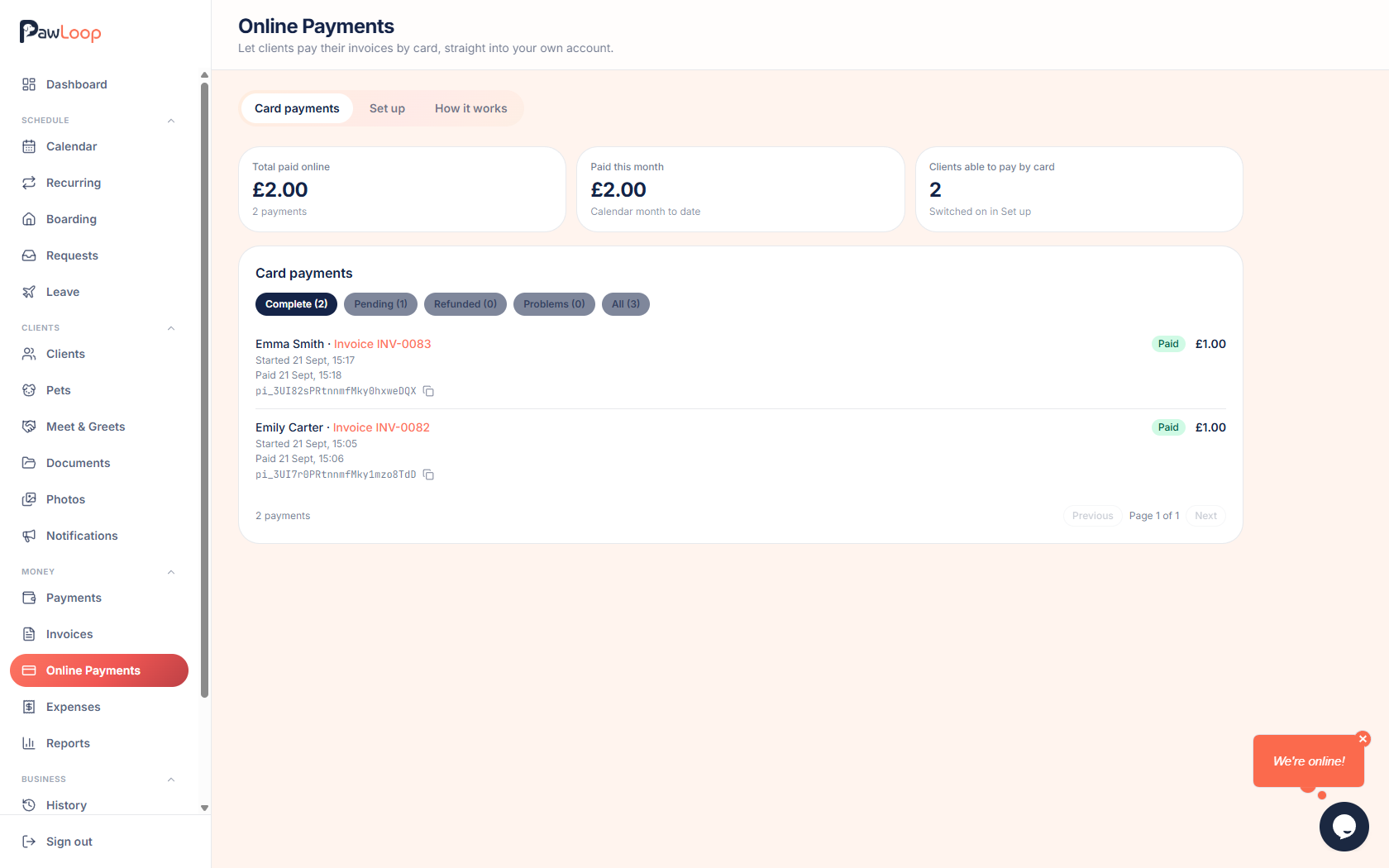
Read the three totals
Total paid online is everything your clients have ever paid by card, with the number of payments underneath.
Paid this month covers the current calendar month to date, and Clients able to pay by card tells you how many clients you have switched on.
Follow payments by status
Payments are grouped into tabs with a count beside each, so nothing gets buried.
- Complete: the payment succeeded and the invoice is settled
- Pending: started or still processing with the bank
- Refunded: fully or partly refunded from your payment portal
- Problems: failed or disputed, with the reason shown in plain words
- All: every payment in one list
Read an individual payment
Each row shows the client's name and the invoice number as a link, so you can open the invoice the payment settled.
Underneath are the dates that apply: when the payment started, when it was paid, and any refund or dispute date. The card used is shown as the type, whether it was debit or credit, the last four digits and the expiry.
Card details are only recorded for payments made since we started capturing them, so older payments show the amount and dates only.
Copy the payment reference
Every payment has a reference beginning pi_ with a copy button beside it. Paste that into the search box in your payment portal to find exactly the same payment there, which is useful when you are issuing a refund or querying something.
Page through older payments
The list shows ten payments at a time, newest first, with Previous and Next at the bottom and the total count beside them.
Try it yourself
Everything in this guide is included from the free Starter plan upwards. Set up in minutes. No card required.
Start free. No card required →Frequently asked questions
Related guides
Create your free PawLoop account today.
Sign up in minutes and try every feature free. PawLoop starts with a 14-day free trial. Every feature included and no payment card required to sign up. Choose a plan when your trial ends.
Start free trialNo spam. No card. Just a free pass to try PawLoop.