How to message all or selected clients
The notification centre lets you write one message and send it to every client, or just the ones you pick. Useful for holiday closures, bad weather or price changes. It's available on the Solo and Team plans.
Open the notification centre
Go to Messages in the sidebar. You'll land on the Compose tab.
If you're on the Starter plan you'll see an upgrade prompt instead, customer messaging needs Solo or Team.
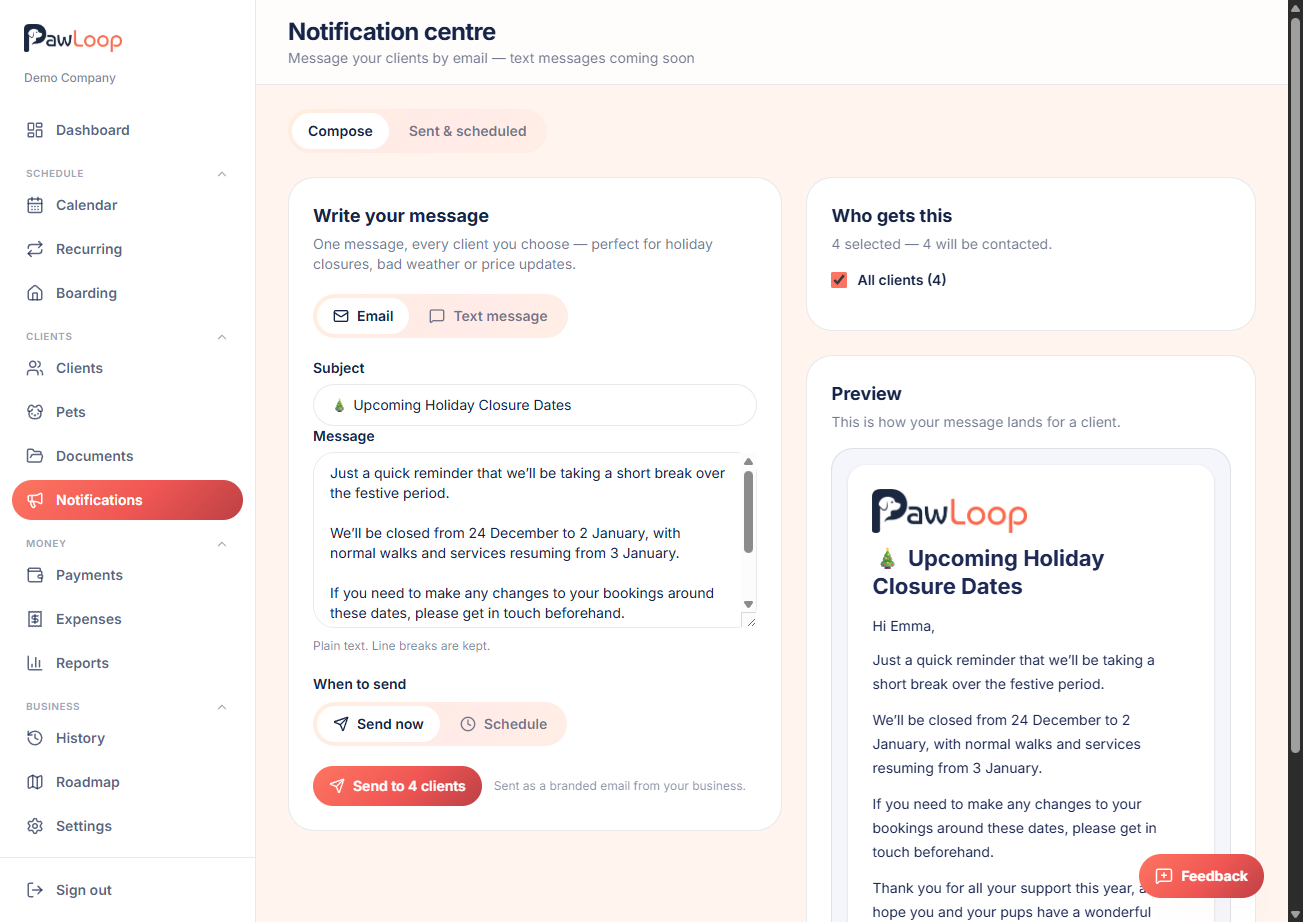
Choose email or text message
Email is the live channel. Text messaging isn't switched on yet. Selecting it shows a preview of how it will look, and nothing can be written or sent until it goes live.
Write your subject and message
For email, add a Subject line, then write your Message as plain text, line breaks are kept when it's sent.
Pick who receives it
By default the message goes to all your active clients. Turn this off to search for and tick individual clients instead.
- PawLoop shows how many chosen clients will actually receive it based on whether they have an email address or phone number on file.
- Anyone missing the right contact detail is listed separately so you know they'll be skipped.
Send now or schedule it
Choose Send now to send straight away, or Schedule to pick a future date and time, handy for announcing a closure a few days ahead.
Check the preview before sending
The panel shows a live preview of the email or text as your client will see it, using your business name and logo.
Review what's been sent
Switch to the Sent & scheduled tab to see past messages and anything still waiting to go out, so you can confirm it was delivered or cancel a scheduled one.
Try it yourself
Everything in this guide is included from the free Starter plan upwards. Set up in minutes. No card required.
Create free account. No card required →Frequently asked questions
Related guides
Create your free PawLoop account today.
Sign up in minutes and try every feature free. PawLoop starts with a 14-day free trial. Every feature included and no payment card required to sign up. Choose a plan when your trial ends.
Start free trialNo spam. No card. Just a free pass to try PawLoop.