How to set up a cancellation policy
A cancellation policy lets you charge clients when a booking is cancelled at short notice. You can set different charges based on how much warning you receive, and you still have the option to override the final price before confirming.
Open Settings → Business → Cancellation Policy
Go to Settings in the sidebar, choose the Business tab, then click Cancellation Policy.
There are two sections: Services covers walks, day care and pet sitting bookings, and Boarding covers overnight stays. Each keeps its own set of rules, so the same notice period can charge a different amount for each.
If you haven't added any rules yet, you'll see an empty state explaining that cancelled bookings stay on record at £0.00 until a rule is created.
Add a cancellation rule
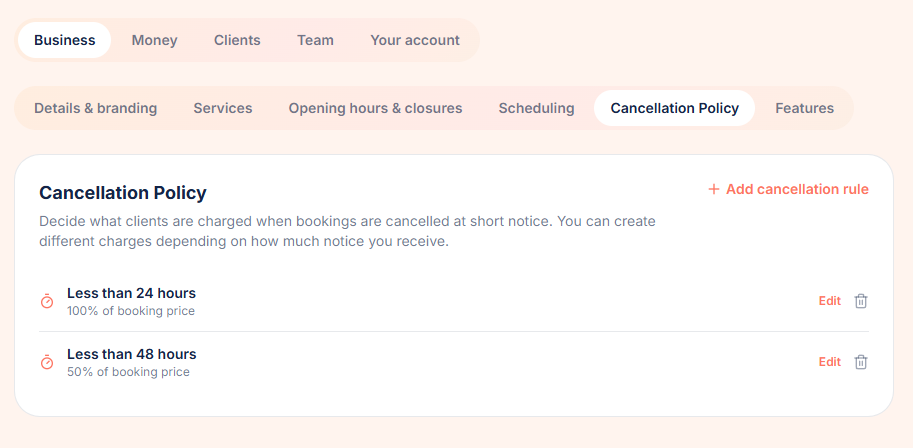
Click Add cancellation rule. Choose the notice period as 'Less than' a number of hours or days, then pick whether the charge is a percentage of the booking price or a fixed amount.
For example, you might create a rule for 'Less than 24 hours' that charges 100% of the booking price, and another for 'Less than 7 days' that charges a £10.00 fixed fee.
Boarding rules work the same way but are added in the Boarding section. A common setup is 100% for services cancelled inside 24 hours, and a £30.00 fixed fee for a stay cancelled inside 7 days.
Understand how rules apply
A rule only matches when a booking is cancelled with strictly less notice than the rule states. Cancelling exactly 24 hours before a walk does not trigger a 'Less than 24 hours' rule.
When more than one rule could match, the shortest notice period wins. If no rule matches, the cancellation is free.
For boarding, notice is measured from the drop-off date and time rather than the end of the stay, and only your Boarding rules are considered.
If no rules exist at all, the cancelled booking is kept on record at £0.00.
Cancel a booking or stay and review the charge
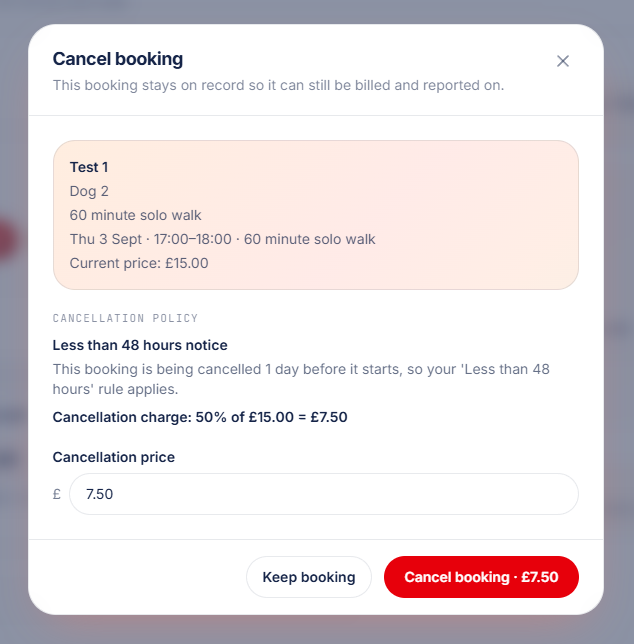
When you cancel a booking, the Cancel booking dialog shows the matched rule, the notice given, and how the charge is calculated. Cancelling a boarding stay opens the same dialog with your boarding rules applied.
If the booking was already paid, the original price is returned to the client's credit balance and the cancellation charge is recorded separately.
Override the cancellation price
The Cancellation price field can be edited before you confirm. This is useful if you want to waive the fee or charge a different amount for a specific situation.
If the amount you enter differs from the policy calculation, PawLoop highlights the difference and lets you reset to the calculated value.
Once cancelled, the booking keeps a snapshot of the rule, charge and any override for the audit log.
Try it yourself
Everything in this guide is included from the free Starter plan upwards. Set up in minutes. No card required.
Create free account. No card required →Frequently asked questions
Related guides
Create your free PawLoop account today.
Sign up in minutes and try every feature free. PawLoop starts with a 14-day free trial. Every feature included and no payment card required to sign up. Choose a plan when your trial ends.
Start free trialNo spam. No card. Just a free pass to try PawLoop.