Walk History for dog walkers
A complete diary, written automatically.
- Every walk, stay and payment becomes a permanent record, written as you work rather than afterwards.
- One merged timeline across bookings, boarding and money, filtered by client, pet, type or date range.
- A separate audit log shows who changed what and when, down to the old and new value.
- Answers to *when did Bailey last come out?* take seconds, not an afternoon.
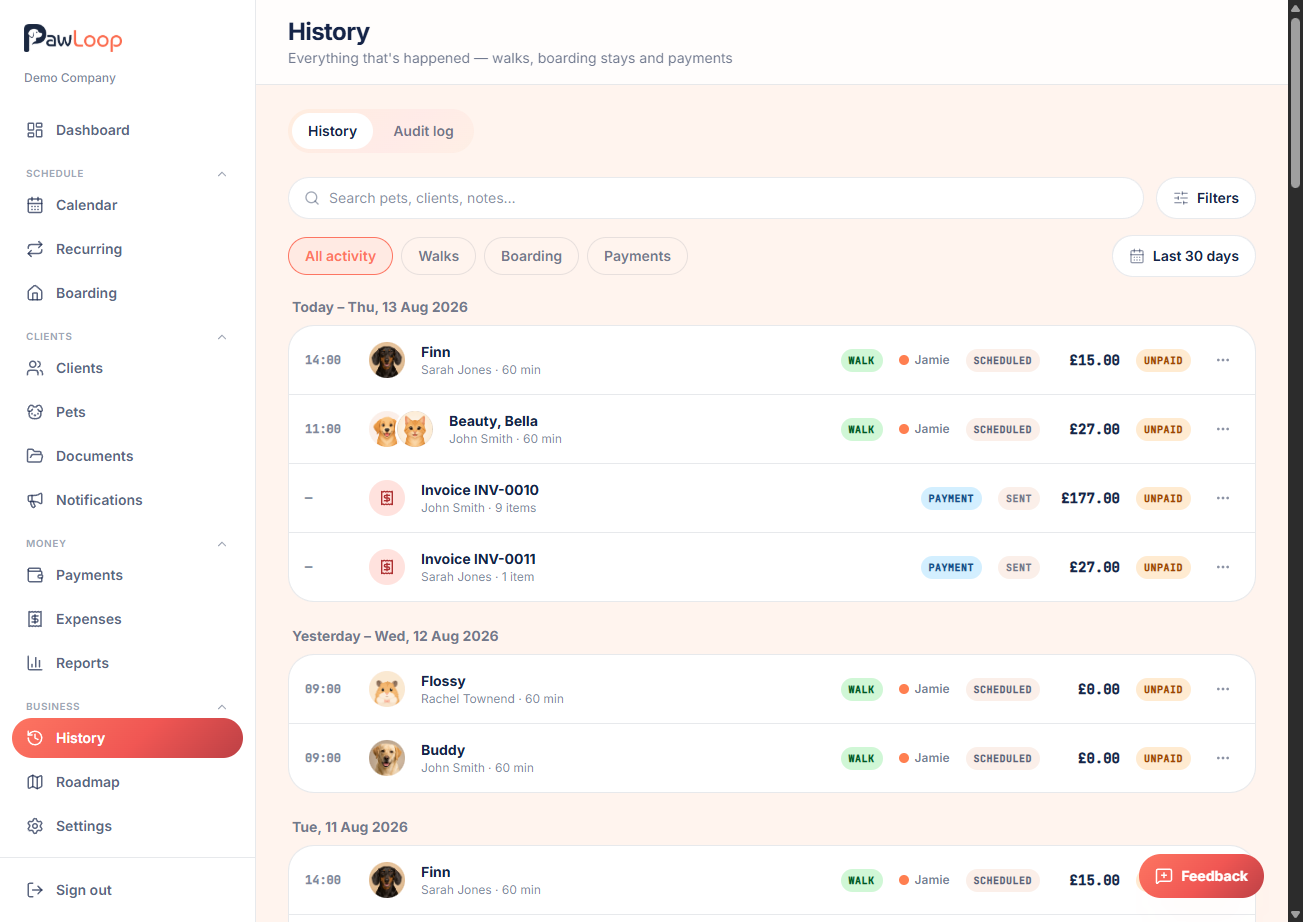
Every walk, day care session, boarding stay and payment you record in PawLoop becomes a permanent entry with the pet, client, date, time, price, payment status, assigned team member and any notes attached. Nothing depends on remembering to write it down afterwards, which is exactly why it can be trusted months later.
That turns awkward questions into quick lookups. An insurance query, a client disputing an invoice, a query about which walker covered a Thursday in March, or a simple when did Bailey last come out, all become a filter rather than an archaeology project. The audit log sits alongside the timeline and goes further, recording who changed what and when, including edits, cancellations and price changes, with the previous and new values, so there is always a version of events you can stand behind.
Key takeaways
What Walk History does for your business
One timeline, everything on it
Completed walks, boarding stays and payments merged into a single chronological feed rather than three separate lists.
Filter down to the answer
Narrow by client, pet, activity type or date range and the question you actually came to answer is on screen in seconds.
An audit log with names on it
Bookings edited, prices changed, clients updated, walks cancelled. Each entry records who did it, when, and what changed.
Nothing to remember to write down
The record builds itself from the work you already log, so year-end isn't an exercise in reconstruction.
One merged timeline
The history page pulls completed walks, boarding stays and recorded payments into a single feed in date order, with the pets, client, amount and status on each entry. Scroll it like a diary or jump to a period.
Filter to the question you're asking
Narrow by client, by pet, by activity type or by date range, on their own or together. Every visit for one dog last year, or everything that happened in a single week, is a couple of clicks.
Per-pet and per-client views
Open any client or pet and see their own history in context: upcoming and past bookings with cancellations marked, boarding stays, invoices and payments, without leaving the record you're already looking at.
An audit log that names names
Separate from the activity feed, the audit log records changes made in the account: bookings created, edited or cancelled, prices adjusted, client and pet details updated, settings changed. Each entry carries the person, the timestamp and what changed from and to, which matters the moment you have more than one pair of hands.
Records that stand up later
Because entries are written as the work happens rather than reconstructed at year end, the history is a genuine contemporaneous record, the sort insurers and accountants prefer to a spreadsheet assembled in April.
Digital records for Making Tax Digital
Keeping digital records of income and costs as they occur is what HMRC's MTD rules ask of UK sole traders. Your history, invoices and expenses together give you that without any extra bookkeeping habit.
Walk History questions, answered
Create your free PawLoop account today.
Sign up in minutes and try every feature free. PawLoop starts with a 14-day free trial. Every feature included and no payment card required to sign up. Choose a plan when your trial ends.
Start free trialNo spam. No card. Just a free pass to try PawLoop.