Client Management for dog walkers
The dog walking CRM: one record that runs the walk, the price and the money.
- Every household holds the address, access notes, vet and emergency contacts you need on the doorstep.
- Set prices per client, not just per service, so a long-standing rate or a two-dog discount is applied automatically.
- One profile shows the full history of walks, boarding, invoices and documents for that household.
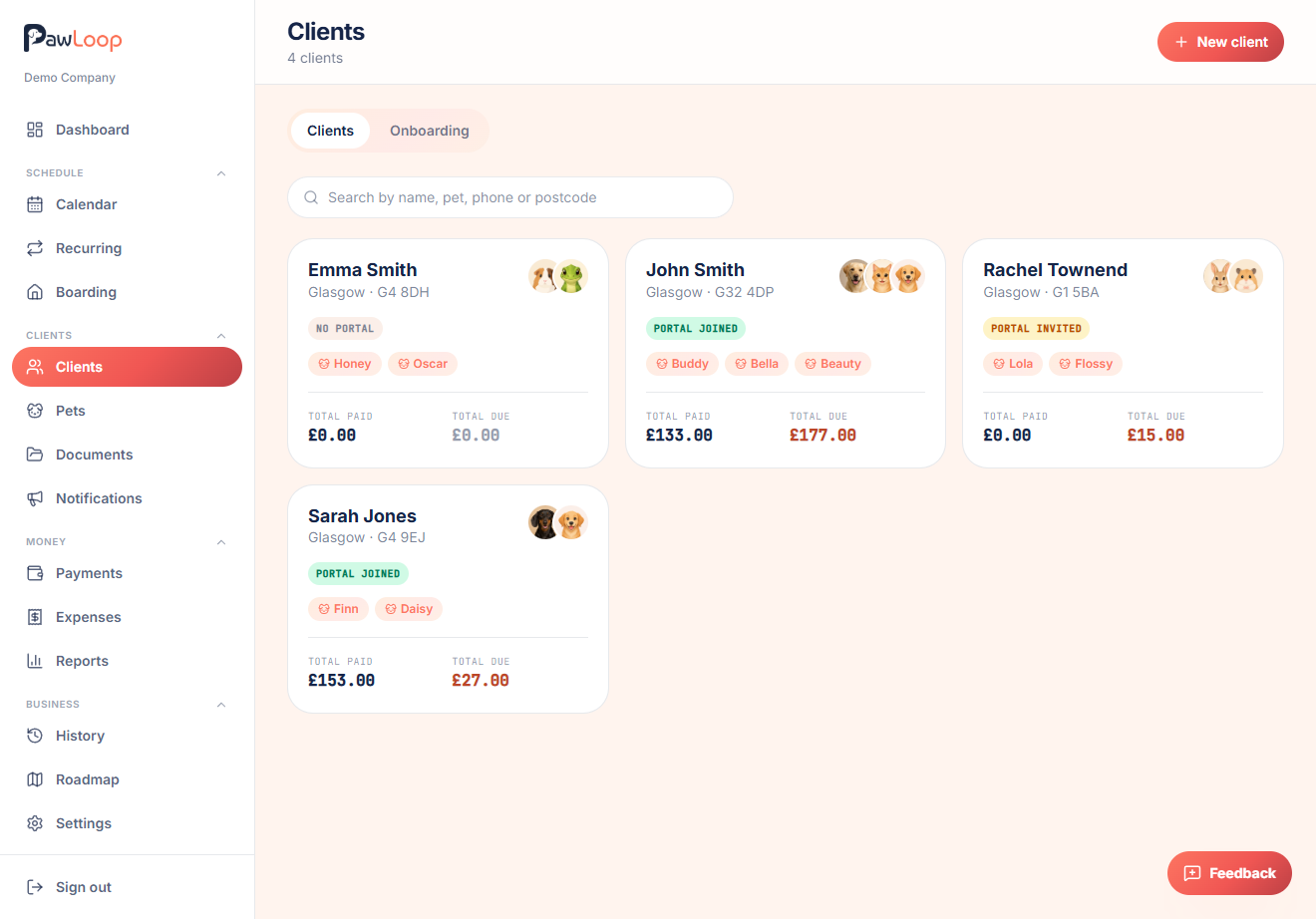
PawLoop is a CRM built for dog walkers. Your client list usually lives in three places: your phone contacts, a notes app and your head. PawLoop pulls it into one structured household record that holds the address and access notes, vet and emergency contacts, the pets in that household and the prices you charge them.
From there the record does real work. Client-specific pricing feeds straight into bookings and invoices, the timeline shows every walk, boarding stay, payment and document, and portal access can be switched on so the client keeps their own details current. Add a client yourself in a couple of taps, convert one from a meet & greet, or send an onboarding link and let them fill it in for you.
Key takeaways
What Client Management does for your business
Everything you need on the doorstep
Address, key code and access notes, vet name and number, emergency contact and your own notes. Organised across Details, Address and Care tabs instead of a WhatsApp thread.
Prices per client, not just per walk type
Set a price for this household on any walk type, including a separate price per additional dog. It overrides your standard rate and applies automatically every time you book them in.
A profile that answers everything
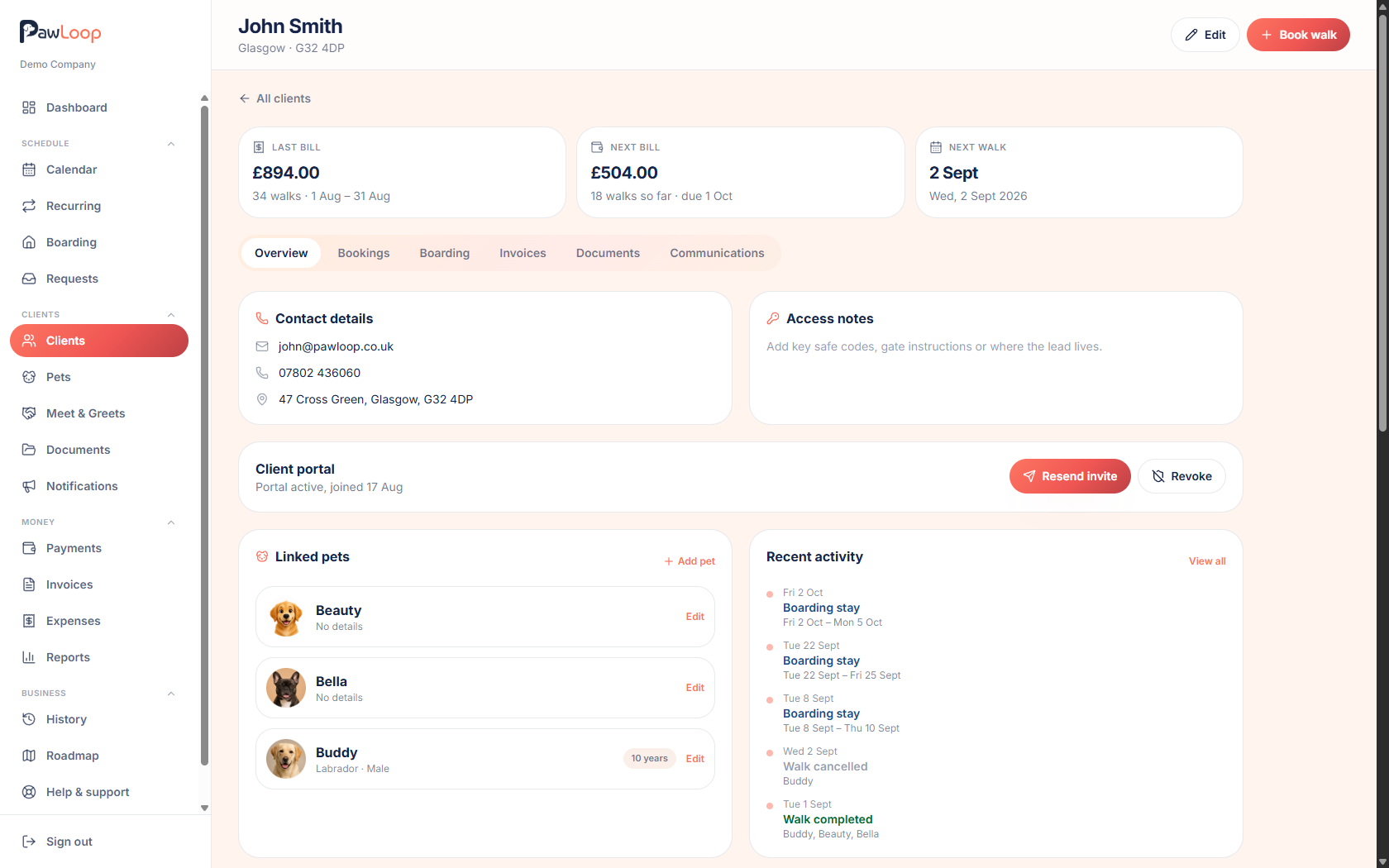
Dogs, recurring loops, upcoming and past walks, boarding stays, totals paid and due, invoices and shared documents. All on one client page.
One household, every detail
The client form is split into Details, Address, Care and Pricing. Details covers name, email and phone. Address covers the two address lines, town, postcode and the access notes you actually need at the door. Key safe code, alarm sequence, which gate, where the lead lives. Care holds the vet's name and number, the emergency contact, and any free-text notes about the household.
Per-client pricing that overrides your rates
Some clients are on a legacy rate, a mates rate, or a bespoke price because of a longer route. The Pricing tab lets you set a price for that household on each walk type, plus a price per additional dog. When you book a walk, PawLoop uses the client's price if one exists and your business-wide price if not, so the maths is right without you remembering anything.
The profile is a mini dashboard
Open a client and the Overview shows their contact and access details, the dogs in the household with photos, their recurring loops, upcoming walks, recent activity and money totals. Tabs alongside it hold the full walk list, boarding stays, invoices and any documents you've shared with them. You can mark a walk paid or unpaid, generate an invoice, add a dog, start a new loop or archive the client from the same page.
Find anyone in a second
The client list searches by name, dog name, phone number or postcode, so 'the lady with the two spaniels in G4' is one search away. Each card shows their location, dog chips with photos, and how much they've paid versus how much is still due.
Walkers only see what they need
Client records are permission-controlled. Team members without money access don't see prices, totals or invoices, and walkers restricted to their own walks don't get the full household profile at all. You choose exactly which roles can view, edit or delete clients.
Client Management questions, answered
Create your free PawLoop account today.
Sign up in minutes and try every feature free. PawLoop starts with a 14-day free trial. Every feature included and no payment card required to sign up. Choose a plan when your trial ends.
Start free trialNo spam. No card. Just a free pass to try PawLoop.