Client Onboarding for dog walkers
Send one link. They fill in everything.
- Send one link and the client types in their own address, contacts and pet details, so you do not.
- Nothing to install and no account to create, which means the form actually gets finished.
- You approve before anything is created, and duplicate checks stop a second copy of an existing household appearing.
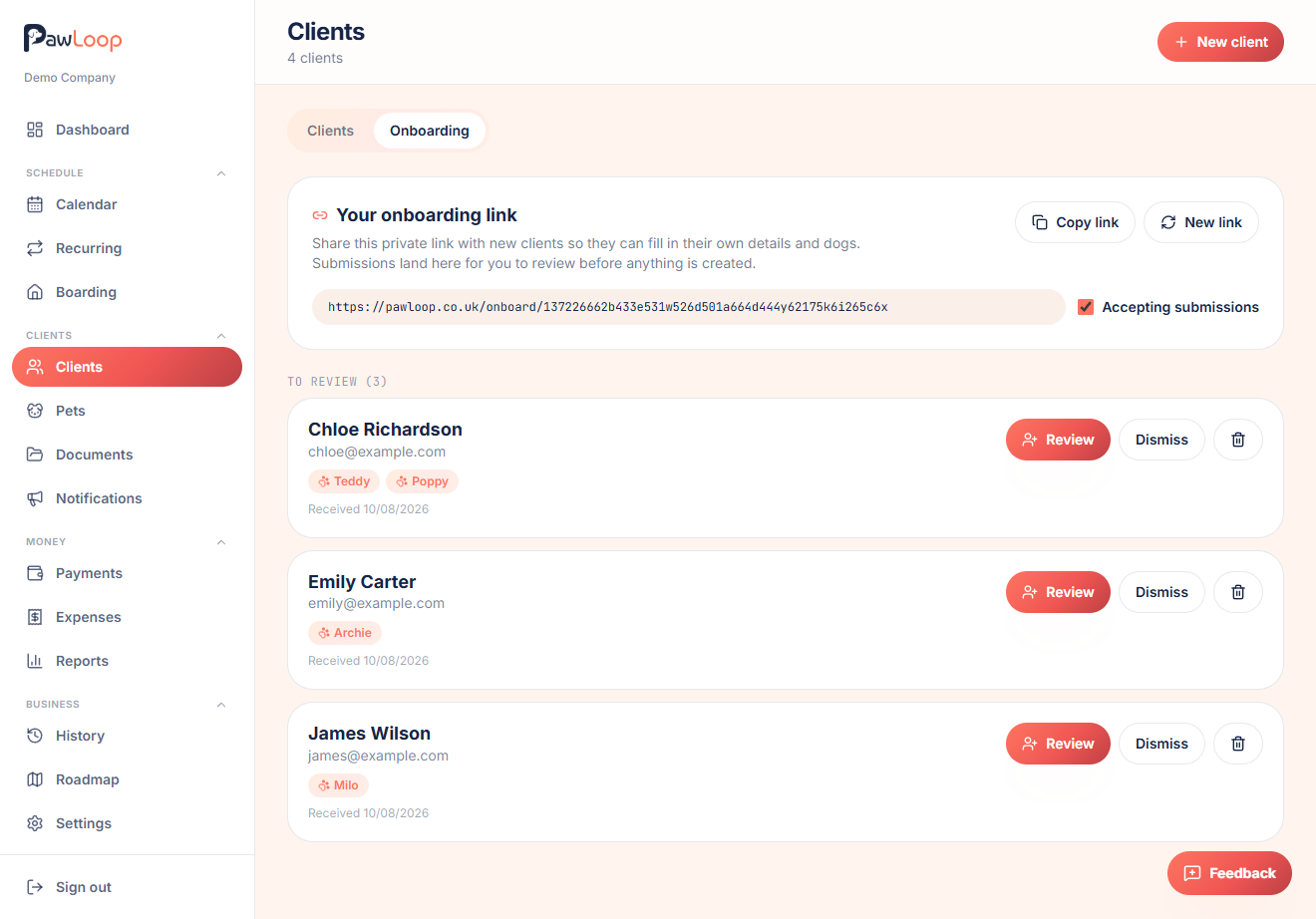
Taking on a new client is the most admin-heavy moment in a dog walking business. You need their address and access notes, a phone number that gets answered, the vet, an emergency contact, and for every pet the breed, age, size, behaviour around other dogs, medication, feeding and walk preferences. Collected over messages it takes days, and half of it never makes it into your records.
PawLoop's onboarding turns that into a single link. You send it, they fill it in on any phone with nothing to install, and the submission lands with you for approval. Accept it and the household and every pet are created for you, complete and consistent, with duplicate checks so an existing client never ends up on your list twice. The link is yours to share, pause or regenerate whenever you want.

Key takeaways
What Client Onboarding does for your business
Zero typing for you
No more transcribing details from voice notes and WhatsApp threads. The owner enters their own information, so it lands in PawLoop already structured and spelled correctly.
Nothing for the client to install
No app, no account, no password. They tap the link on their phone, fill in a friendly form, add as many dogs as they have, and they're done in a couple of minutes.
You approve before anything is created
Submissions land in an Onboarding tab inside Clients. Review, edit anything that needs tidying, then onboard, or dismiss it if it's spam.
Duplicate-safe
If the email or phone already matches an existing client, PawLoop flags it and switches to updating that record. Matching submitted dogs to existing ones instead of creating duplicates.
Your link, your control
The link is long and unguessable, unique to your business, and can be switched off or regenerated whenever you like. It never exposes anything about your existing clients.
How it works, start to finish
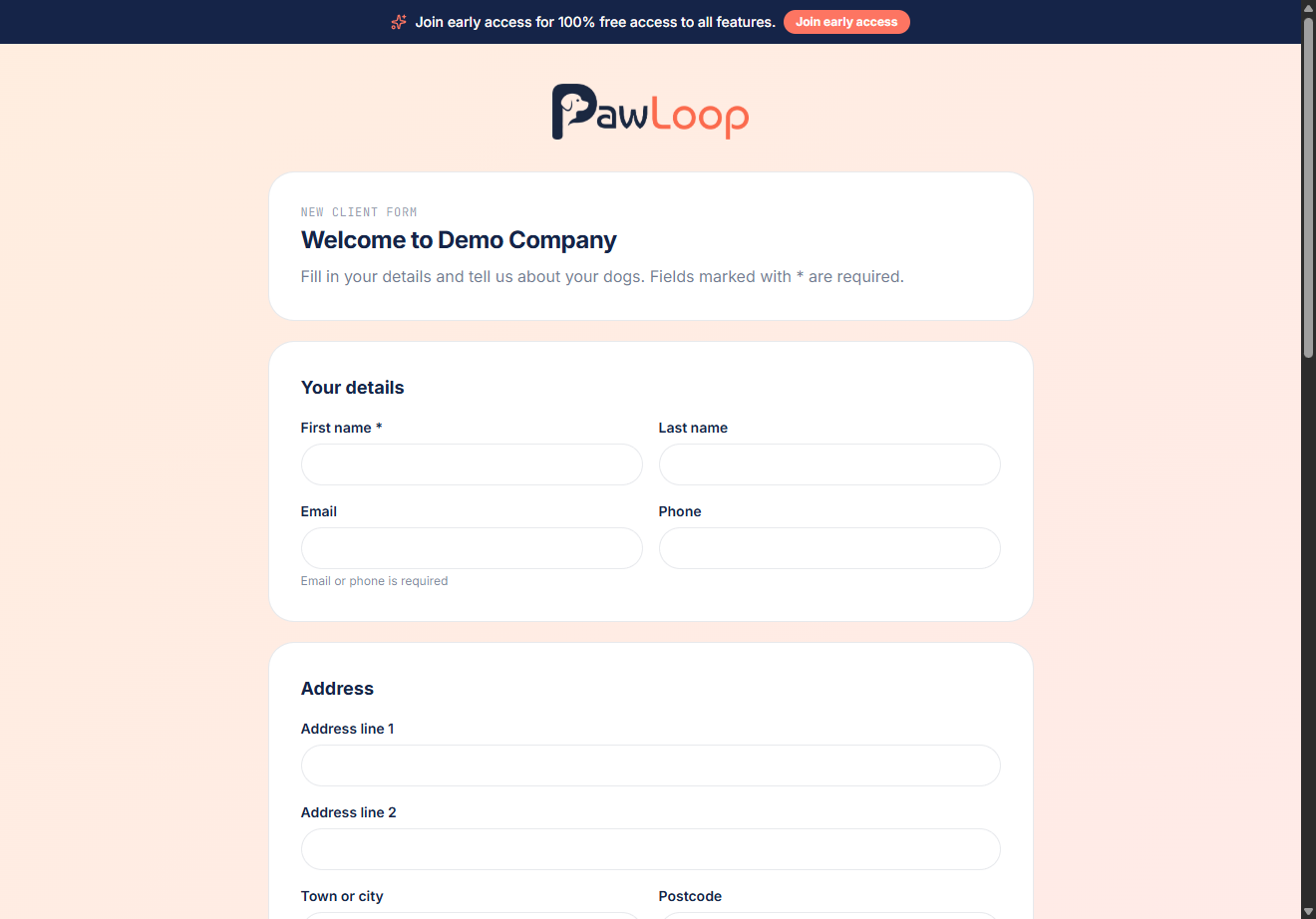
Open Clients, switch to the Onboarding tab and copy your private link. Send it to a new client however you already talk to them. Text, email or WhatsApp. They open a simple page branded with your business name and fill in their details and their dogs. The moment they submit, you get an email letting you know a new client is waiting. Open the submission, check it over, edit anything, and hit Onboard. The client record and every dog are created instantly, and the submission is marked as onboarded and logged in your audit trail.
What the client is asked
Name, email and phone, full address with any access notes, vet name and number, and an emergency contact. Then an 'Add a dog' section they can repeat as many times as they need: name, breed, date of birth, size, gender, weight, behaviour notes, medical notes, feeding notes and walk preferences. Only the essentials are required. A name, an email or phone, and a name for each dog, so nobody abandons the form halfway through.
Effortless setup when you're getting started
Moving from a notebook or spreadsheet is the biggest hurdle for any new system. Instead of an evening of data entry, send your onboarding link to your existing clients and let them populate their own records. Within a day you have a clean, accurate client list with every dog attached, built by the people who know the details best.
Existing clients are matched, not duplicated
When a submission's email or phone matches someone already in your system, PawLoop flags it at review with the matching household. Accept the match and the action becomes 'Update client record'. The new details merge into the existing profile, submitted dogs can be matched to existing dogs and updated in place, and anything new is added. Reject the match and it creates a fresh client as normal.
Private by design
The public form shows your business name and nothing else. It never lists, searches or hints at your existing clients, submissions are rate limited and validated server-side, and nothing is written to your live client list until you approve it.
Client Onboarding questions, answered
Create your free PawLoop account today.
Sign up in minutes and try every feature free. PawLoop starts with a 14-day free trial. Every feature included and no payment card required to sign up. Choose a plan when your trial ends.
Start free trialNo spam. No card. Just a free pass to try PawLoop.