Client Portal for dog walkers
A branded login for your clients.
- Clients get a branded login at your own web address, not a generic third-party page.
- They can see upcoming walks, past visits, boarding stays and what they owe, all read-only.
- They keep their own details, pets and documents up to date, which stops most of the messages before they start.
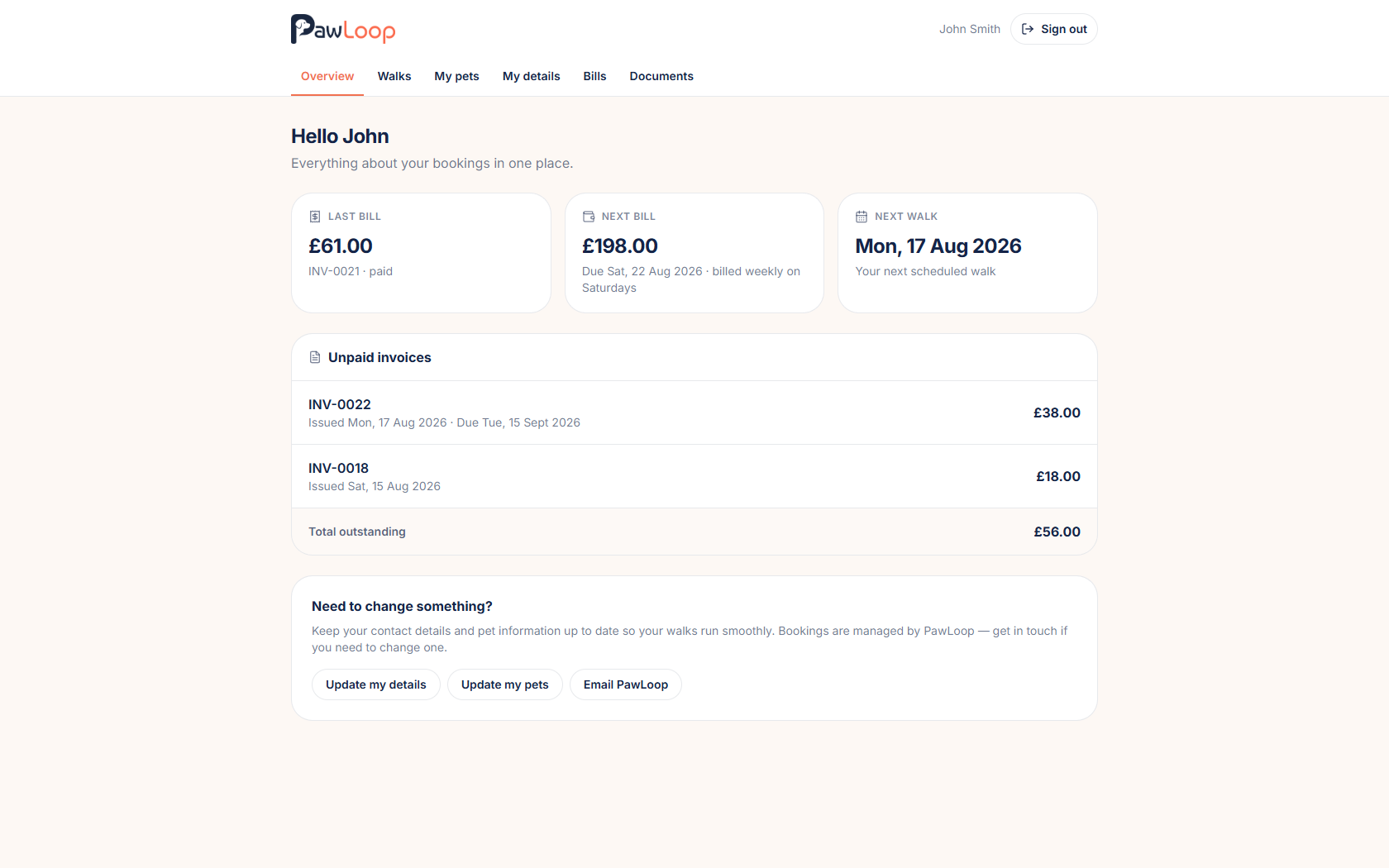
Most of the messages a walker gets are questions the client could answer themselves. When is the next walk, what do I owe, can you resend the invoice, here are our new puppy's details. Each one is small, and together they take over your evenings.
The client portal is a branded login where clients handle all of that on their own while you keep control of the diary. They get a private login with password recovery, upcoming and previous walks, boarding stays with the daily care log, unpaid invoices and an estimated next bill, invoice history they can print or save as a PDF, any documents you have shared, and read-only pet profiles with the edits you choose to allow. Depending on your settings they can also send booking requests, update contact, address and access details, and upload vaccination certificates. You can log in as a client at any time to see exactly what they see. The portal is included on Solo and Team.
Key takeaways
What Client Portal does for your business
Your branding, your web address
The portal lives at your own PawLoop address with your logo, accent colour and an optional welcome message, so it feels like part of your service rather than someone else's app.
Walks and bills, read-only
Clients see their upcoming and completed walks, their boarding stays, their unpaid invoices and an estimated next bill. Nothing they can change, nothing you need to explain twice.
Fewer messages, quieter evenings
When is the next walk, what do I owe, can you resend that invoice: the three questions that eat your evenings are answered before anyone picks up their phone.
Clients keep their own details fresh
They can update contact, address and access details, and add a pet or upload a vaccination certificate where you allow it, and the record lands straight in PawLoop.
You control what is switched on
Booking requests, adding pets, uploading vaccination records and editing details are each a toggle in your portal settings, so the portal does only what you want it to do.
You keep the diary
Nothing a client does moves your calendar. Booking requests come to you to accept or decline, so the schedule is still yours.
Set it up to look like you
Choose the web address, add your logo, pick an accent colour and write a short welcome message. Clients land on something that clearly belongs to your business rather than a generic login page.
Invite a client in one click
Send a portal invite from the client's record and they set their own password, with recovery if they forget it. Their status is visible on the client list, so you always know who has access and who still needs inviting.
Walks, stays and bills in one place
Clients see upcoming and past walks under separate tabs, boarding stays with the daily care log, and a summary of anything unpaid alongside an estimated next bill. Records are paginated so a long-standing client can scroll back without wading through everything at once.
Invoices and documents, always to hand
Every invoice is viewable, printable and saveable as a PDF, and any document you have shared, welcome pack, terms, care agreement, is one tap away. Your internal notes and pricing workings stay private to you.
Details they can keep current
Clients can update supported contact, address, access and pet information, and add a pet or upload a vaccination certificate if you switch those on. Pet profiles are read-only where it matters, so nothing you rely on gets quietly overwritten.
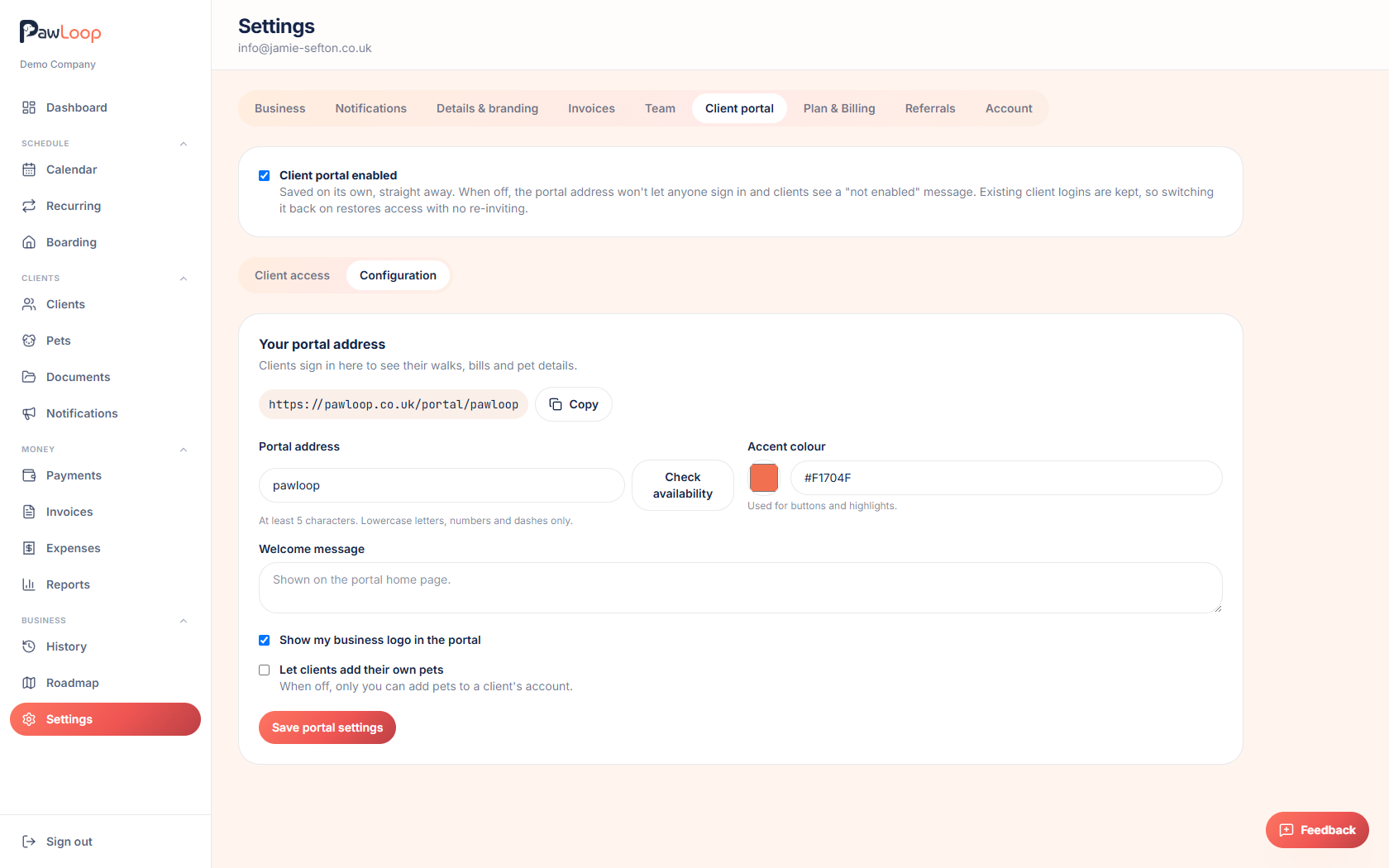
See exactly what your clients see
From a client's record you can log in as them and view the portal through their eyes, which makes it easy to check what you have shared before you invite anyone.
Client Portal questions, answered
Create your free PawLoop account today.
Sign up in minutes and try every feature free. PawLoop starts with a 14-day free trial. Every feature included and no payment card required to sign up. Choose a plan when your trial ends.
Start free trialNo spam. No card. Just a free pass to try PawLoop.