Cancellation Policies for dog walkers
Never forget who owes you for a cancellation.
- Set your own notice windows and fees, as a percentage of the booking or a flat amount.
- Separate rules for services and boarding, so a late walk and a cancelled stay can be charged differently.
- When a walk or stay is cancelled, PawLoop works out the charge for you and keeps it against the booking.
- Chargeable cancellations flow straight into invoicing, labelled as a cancellation fee, so clients pay them with everything else.
Every dog walker has a cancellation policy in their head. Very few manage to actually charge for it. The walk gets cancelled in a rush, you make a mental note to add it to the invoice, and by the end of the month it has quietly vanished along with the money.
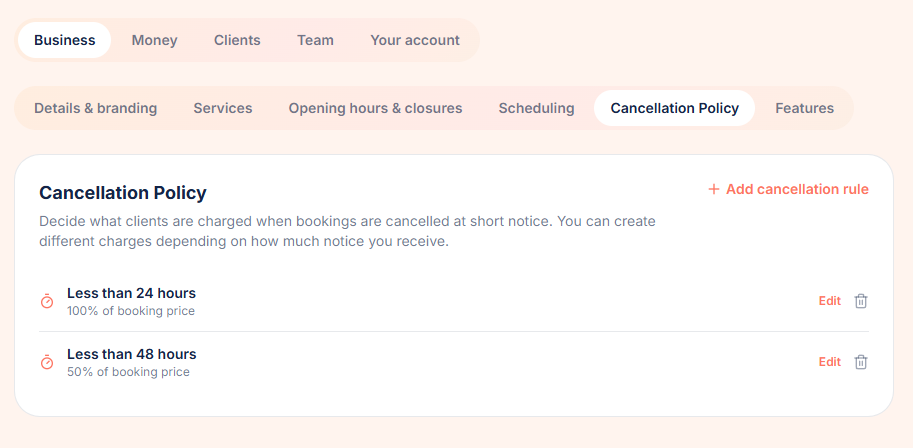
PawLoop turns that policy into something the system enforces for you. You define your notice windows and what you charge inside each one, with one set of rules for services and another for boarding, so a cancelled walk and a cancelled stay can be treated very differently. When a booking or a stay is cancelled, PawLoop compares how much notice was given against the right set of rules, works out the charge, shows it to you before you confirm, and stores the result. From there it behaves like any other piece of billable work: it appears when you generate invoices, it is labelled as a cancellation fee so there is no awkward conversation, and it counts towards your income reporting.
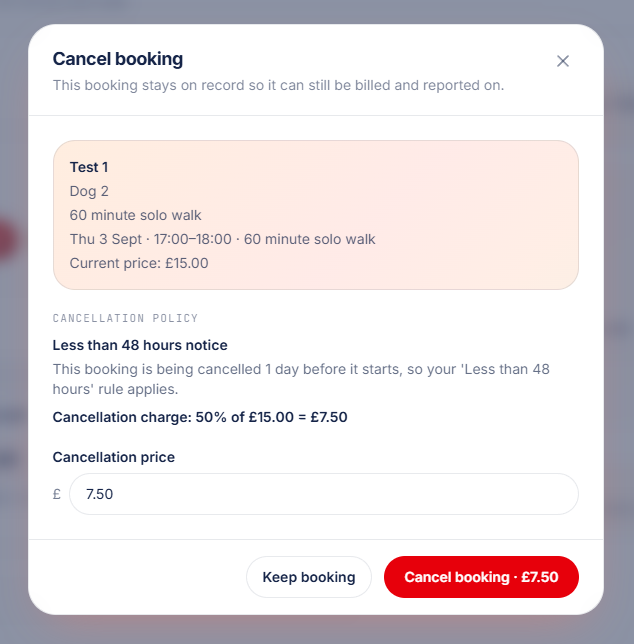
You stay in control. Every calculated charge can be edited at the moment of cancellation, so a goodwill waiver takes one click and is still recorded properly.

Key takeaways
What Cancellation Policies does for your business
Nothing gets forgotten
A late cancellation that still carries a charge stays attached to the booking or stay and shows up as unbilled work. You don't have to remember it, write it on a note, or chase it separately.
Services and boarding, priced separately
Keep two sets of rules. Walks, day care and pet sitting can be 100% inside 24 hours, while a cancelled boarding stay takes a fixed fee instead. Same notice window, different charge.
Billed automatically
Cancelled bookings and stays with a charge above zero appear in invoice generation like any other completed work, marked as a cancellation fee so the client can see exactly what it is.
Override when you want to
The suggested charge is shown before you confirm the cancellation, and you can change it there and then. Waive it for a loyal client, or reduce it because the weather was awful.
Set your rules once, for services and boarding
In Settings, under Business, the cancellation policy is split into two sections. Services covers walks, day care and pet sitting. Boarding covers overnight stays. Each rule has a notice window in hours or days and a fee, either a percentage of the price or a fixed amount. A common setup is 100% for a service cancelled with less than 24 hours notice, 50% inside 48 hours, and a fixed £30 for a boarding stay dropped inside 7 days. The same notice window can exist in both lists with a different charge, there is no limit on how many windows you add, and leaving a section empty means those cancellations stay free.
The right rule applies automatically
When a booking or a boarding stay is cancelled, PawLoop measures the notice given against your windows for that type of work and applies the rule with the shortest matching window. Boarding notice is measured from the drop-off time. A walk cancelled 12 hours ahead matches your 24 hour rule rather than your 48 hour one, so the client is charged the stricter fee. Cancel with more notice than any rule covers and there is no charge at all.
See the charge before you confirm
Cancelling a walk or a boarding stay opens the same confirmation dialog. It shows which rule matched, the original price and the amount that will be retained. The price is editable, so you can waive it, round it down, or charge something different for a one-off situation. Whatever you choose is what gets recorded.
Cancellations get billed with everything else
Any cancelled booking or stay still carrying a charge above zero appears in invoice generation next to your completed work. The line item is marked as a cancellation fee, so your client sees plainly what they are paying for, and you never have to raise a separate invoice or remember to add it manually.
Already paid? The client gets credit
If the booking or stay had already been paid for, PawLoop keeps the cancellation charge and issues the rest back as client credit, which is applied automatically against their future work. Nobody has to work out refunds on a calculator.
A record of what was charged and why
The rule that matched, the original price, the retained charge and any manual override are stored on the booking or stay. Open the cancelled walk or stay later and the banner explains exactly what happened, which is what you want when a client queries a fee three weeks after the event. There's a full walkthrough in the cancellation policy guide.
Cancellation Policies questions, answered
Create your free PawLoop account today.
Sign up in minutes and try every feature free. PawLoop starts with a 14-day free trial. Every feature included and no payment card required to sign up. Choose a plan when your trial ends.
Start free trialNo spam. No card. Just a free pass to try PawLoop.