Smart Calendar for dog walkers
Your whole week, in one glance.
- See your whole operation in a day or week time grid you can scan in two seconds between visits.
- A schedule list view turns the day into a simple running order for the phone in your pocket.
- Colour-coded by team member or service so clashes and gaps are obvious without reading a line of text.
- Walks, day care, boarding stays and closures all sit on the same calendar, not in four places.
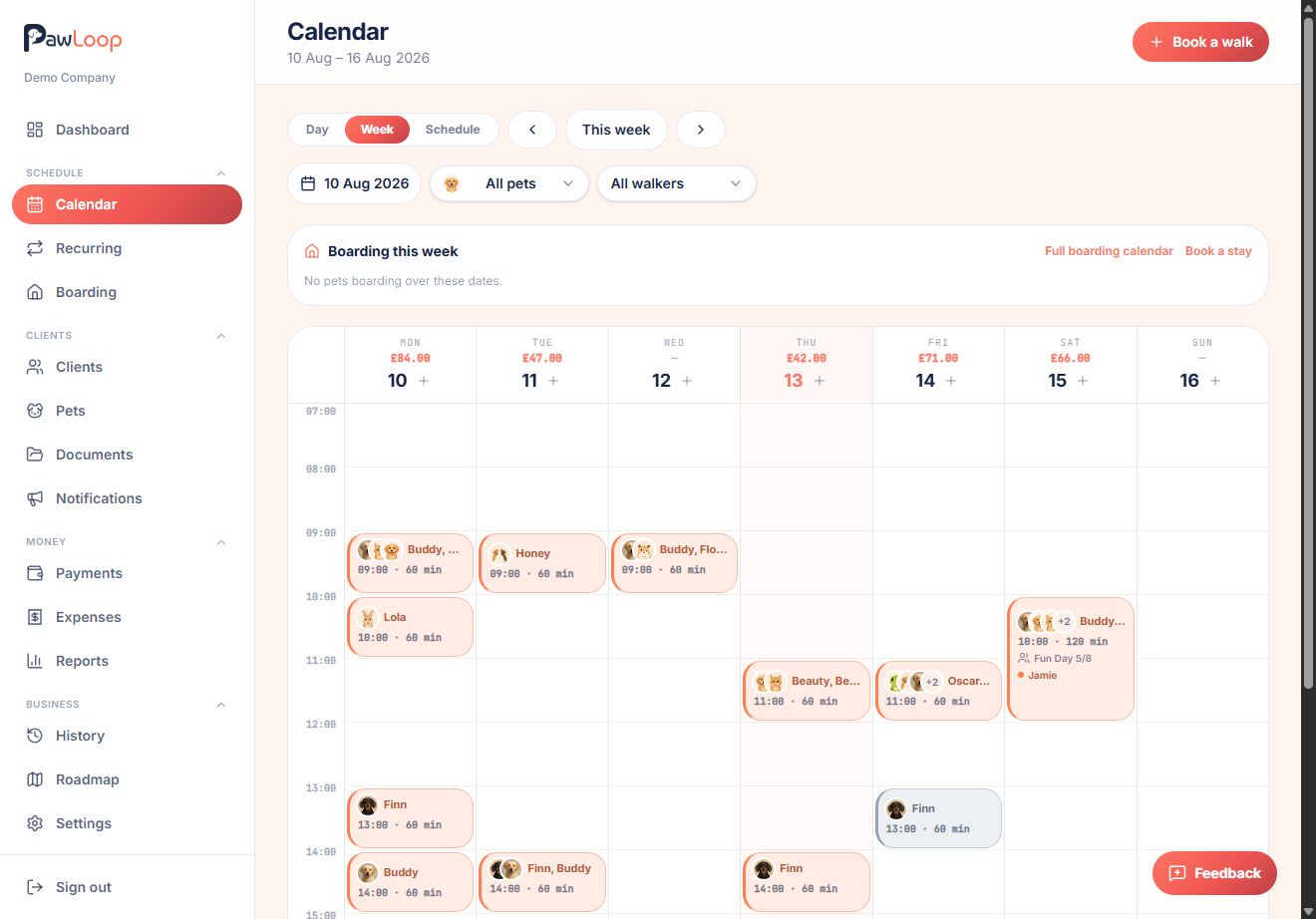
Generic calendar apps were never built for someone juggling twenty dogs across three postcodes. PawLoop's calendar is purpose-built for pet care: a proper time grid with day and week views, a schedule list for the phone, colour-coding by walker or service, and a layout that stays readable on a wet morning with one hand free.
Everything on it is a live record rather than a note to yourself. Each block carries the client, pets, service, duration, assigned walker and payment status, and opening one lets you change any of it. Group walks sit together, day care and boarding stays appear alongside ordinary visits, recurring loops fill the weeks ahead automatically, and business closures grey out the days you are not working so nothing gets booked into them by accident.

Key takeaways
What Smart Calendar does for your business
Day, week and schedule views
Run your morning with a tight day view, plan ahead with the week, or read the day as a simple ordered list.
Everything on one grid
Walks, day care sessions, boarding stays and business closures share the same calendar, so nothing hides in another screen.
Colour-coded clarity
Colour by team member or service type, with the colours set in your settings, so the shape of the day is legible at a glance.
Book and edit from the grid
Tap an empty slot to create a booking at that time, or open an existing one to change time, service, pets, price or the walker assigned.
Day view for the morning rush
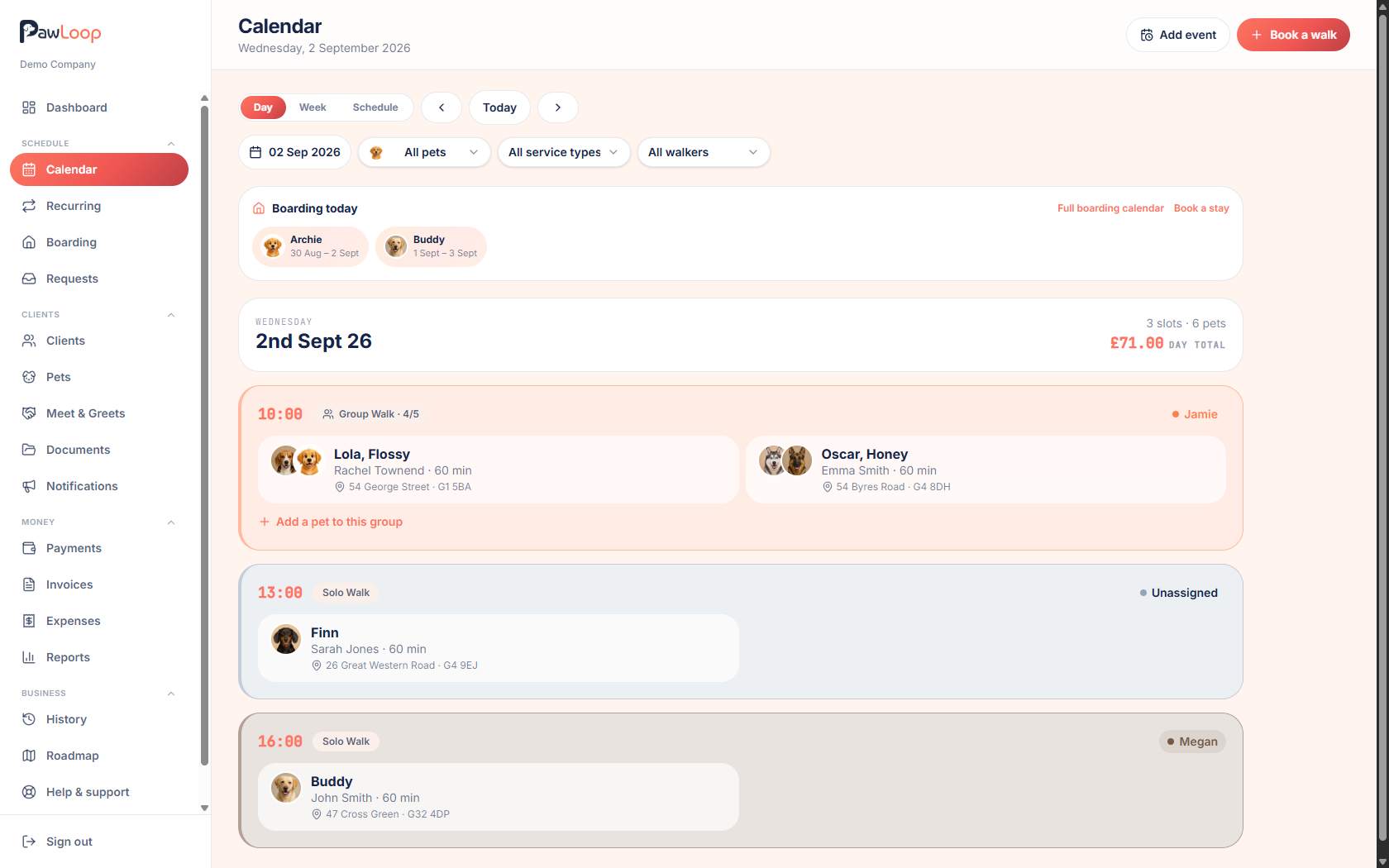
A time grid for today with every booking in order, showing the client, pets, service, duration and who's covering it. Current time is marked, so a glance tells you what's next rather than what's already done.
Week view for planning ahead
Zoom out to the full week as a time grid. Spot the gap on Thursday afternoon where a new client could fit, and see which morning is already overloaded before you agree to anything else.
Schedule view for the phone
Not everyone wants a grid on a small screen. Schedule view lists the day's bookings in order as cards, which is often the fastest way to work through a round between houses.
Colour-coded the way you think
Colour bookings by team member to see who's where, or by service type to see the shape of the work. Colours are set in your settings and used consistently across the calendar.
Every kind of work in one place
Walks, day care sessions and boarding stays all appear on the calendar, with boarding shown across the days it actually runs. Business closures grey out the dates you're not working, and closing a period can cancel the affected bookings for you.
Filter down to one walker
With a team, filter the calendar to a single person to sanity-check their day, or view everyone together to catch a clash before it becomes a phone call.
Book straight from the grid
Tap an empty slot and the new booking opens at that time and date. Pick the client, pets and service, set the price or take the default, assign a walker, and add notes for whoever is doing the visit.
Recurring work fills itself in
Weekly, fortnightly and monthly loops generate their bookings ahead of time, so a regular client's slots are already on the calendar without you copying anything forward.
Smart Calendar questions, answered
Create your free PawLoop account today.
Sign up in minutes and try every feature free. PawLoop starts with a 14-day free trial. Every feature included and no payment card required to sign up. Choose a plan when your trial ends.
Start free trialNo spam. No card. Just a free pass to try PawLoop.