Expense Tracking for dog walkers
Log costs in seconds, recurring ones log themselves.
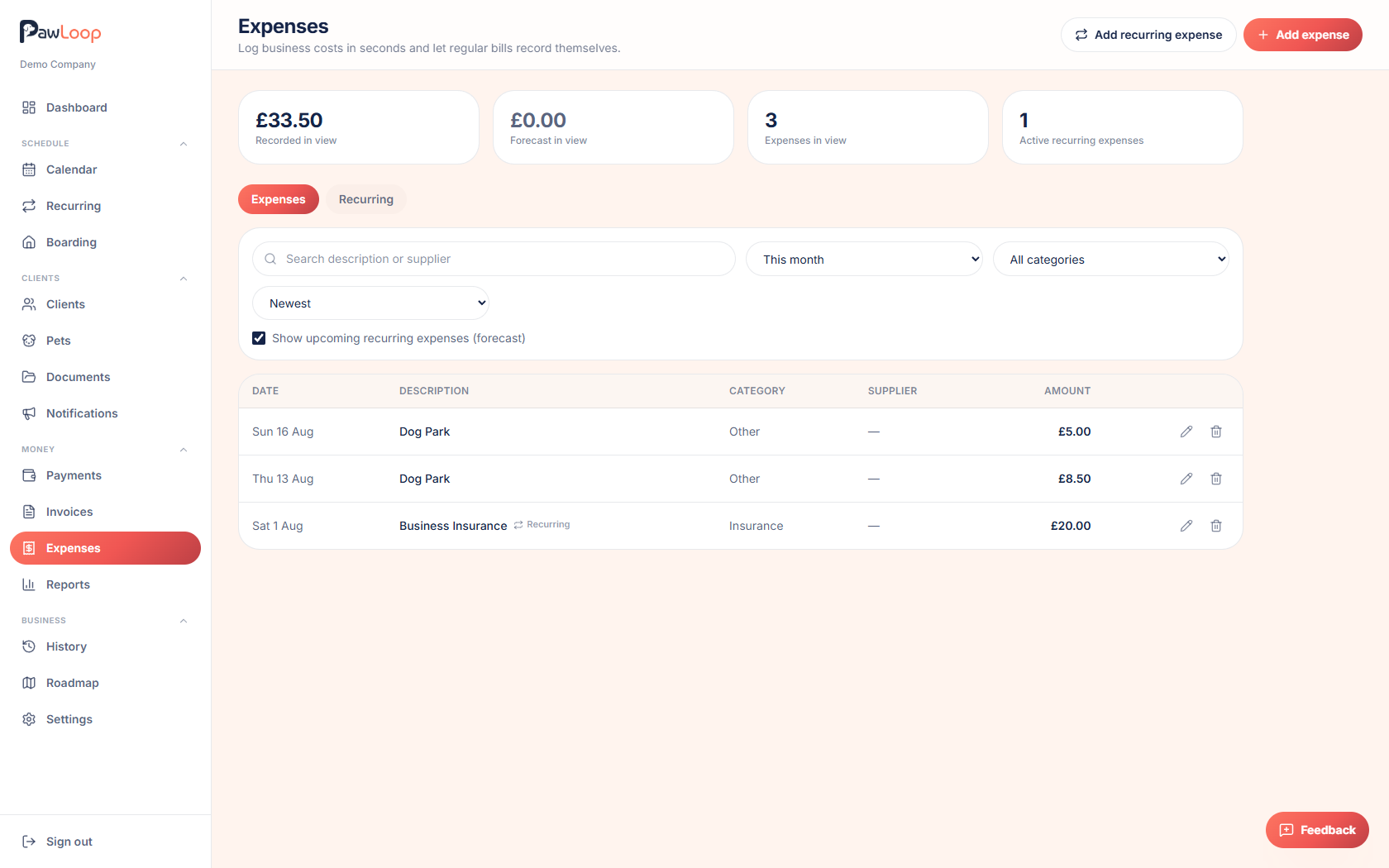
- Log a one-off cost in a few taps with a date, amount, category, supplier and description.
- Set a recurring cost once, weekly through to yearly, and it records itself as each one falls due.
- Turn on the forecast and see the costs still to come, then watch every one feed your profit reports.
Knowing what you earned is only half the picture. Fuel, insurance, kit, vehicle costs, phone bills and your accountant all come out of the same income, and most walkers only see the true figure once a year when it is far too late to change anything.
PawLoop's expense tracking is deliberately small so it actually gets used. Log a one-off cost in a few taps with a category, supplier and date, set the costs that repeat on their own schedule, and let PawLoop record each one as it falls due. Search, filter by category, choose a date range and sort by newest or largest to find anything again, and switch on the forecast to see the costs still to come. Everything flows into the Expenses and Profit & Loss reports automatically, so profit is a live number rather than an annual shock.
Key takeaways
What Expense Tracking does for your business
One-off costs in seconds
Date, amount, category, supplier and a short description. That's the whole form, which is why it actually gets used between walks.
Recurring costs on autopilot
Weekly, fortnightly, monthly, quarterly, every six months or yearly, with a start date and an optional end date. PawLoop creates each one as it falls due.
Pause instead of delete
A recurring cost can be paused and resumed, or ended, so a van finance agreement or a seasonal cost doesn't have to be rebuilt from scratch.
Forecast what's still coming
Switch on the forecast and upcoming recurring costs appear alongside recorded ones, clearly marked as not recorded yet, so a quiet month isn't a surprise.
Feeds straight into reporting
Every expense lands in the Expenses and Profit & Loss reports, so you see what you kept rather than what you turned over.
Built for the costs a walker actually has
PawLoop seeds a set of sensible categories the day you start, covering fuel and travel, insurance, licence fees, equipment, vehicle costs, phone and software, marketing and professional fees. Log a cost against one and the reports group them for you, no chart of accounts required.
Recurring expenses that record themselves
Set the amount, category, supplier, frequency and start date, and PawLoop creates the expense every time it falls due. Weekly, fortnightly, monthly, quarterly, every six months and yearly are all supported, with an end date if the cost stops. Change the frequency or start date and the next occurrence is worked out again for you, skipping any dates already in the past.
Pause, resume or end a cost
Costs change. Pause a recurring expense while a van is off the road, resume it when it returns, or end it entirely when a contract finishes. The history you've already recorded stays exactly as it was.
Forecast the costs still to come
The forecast toggle projects your recurring costs across the period you're looking at and shows them alongside real records, marked as upcoming and not recorded yet. Your headline tiles split recorded from forecast, so you can see what the month is really going to cost before it does.
Find any cost again
Search by description or supplier, filter by category, choose a date range from presets or set your own, and sort by newest, oldest, highest or lowest amount. Answering what did I spend on insurance last year takes seconds.
Real profit in your reports
Expenses flow into the Expenses and Profit & Loss reports alongside your walk and boarding income over any period you choose, broken down by category so you can see where the money actually goes.
Ready for Making Tax Digital
Keeping digital records of income and costs as they happen is exactly what HMRC's MTD rules require of UK sole traders. Logging as you go means nothing to reconstruct later.
Expense Tracking questions, answered
Create your free PawLoop account today.
Sign up in minutes and try every feature free. PawLoop starts with a 14-day free trial. Every feature included and no payment card required to sign up. Choose a plan when your trial ends.
Start free trialNo spam. No card. Just a free pass to try PawLoop.