What's new in PawLoop: 27 September to 4 October
A big week. The calendar has new ways to lay out your day, week and month, you can bring your whole client list across from a spreadsheet in minutes, and expenses can now be filled in from a photo of the receipt. There is also a new setup tool, a start page you choose yourself and plenty of smaller improvements across billing, messages and sign-up.
A calendar that fits how you work
Days and Times layouts
Choose how the calendar is laid out in day, week and month modes. Lay the week out by days, or turn it sideways and read across by time, so you can compare the same hour across the whole week. PawLoop remembers your choice next time you open it.
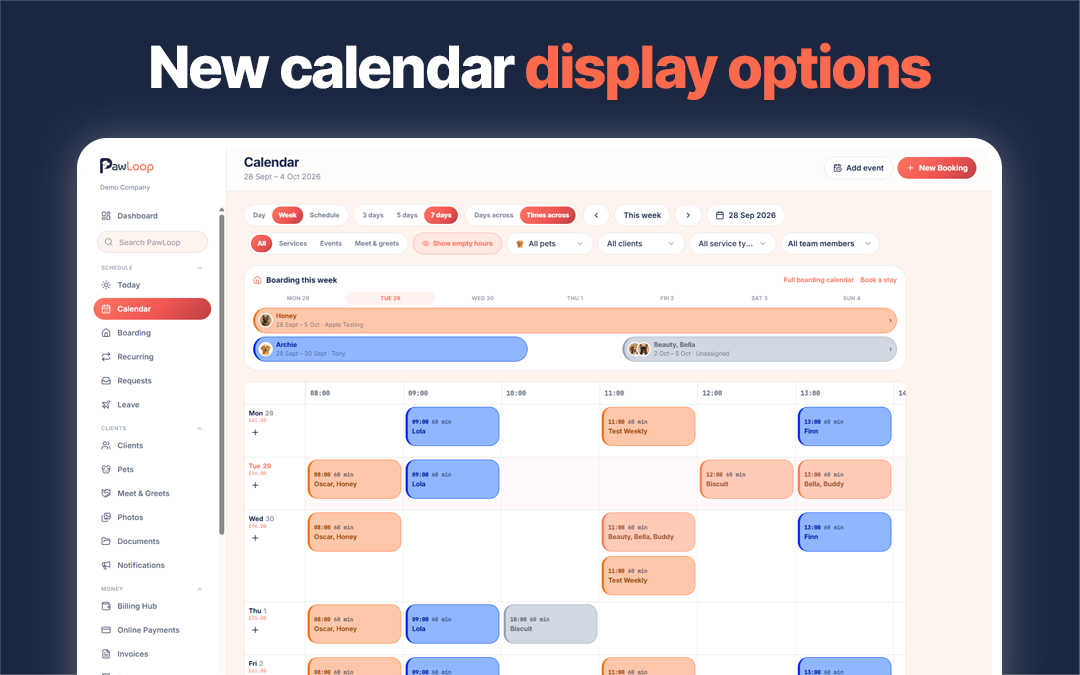
Hide empty hours
Switch on Hide empty hours to skip the quiet parts of the day and see only the hours with bookings. The Adjust panel and the calendar filters have been tidied up so every option looks and works the same way.
Easier to move around
Drag the timeline to scroll through the day. The calendar shows the current time and opens at it, without jumping around when it loads.
Group walks at a glance
Group walks show how full they are, for example 3/6, so you can see where there is space to add another dog. Groups can also be sorted.
More detail where you need it
Walk length now sits beside the start time, the mobile Day view is more compact, and access notes and client notes show on calendar bookings so the team has them on the day.
A calendar fix
Businesses with team leave switched off could see an error on the calendar. This is fixed.
Bring all your clients across at once
Bulk client import
Open Clients and choose Import to bring in clients and their pets from a spreadsheet. A five step guide takes you through uploading the file, matching your columns and checking everything before anything is saved.
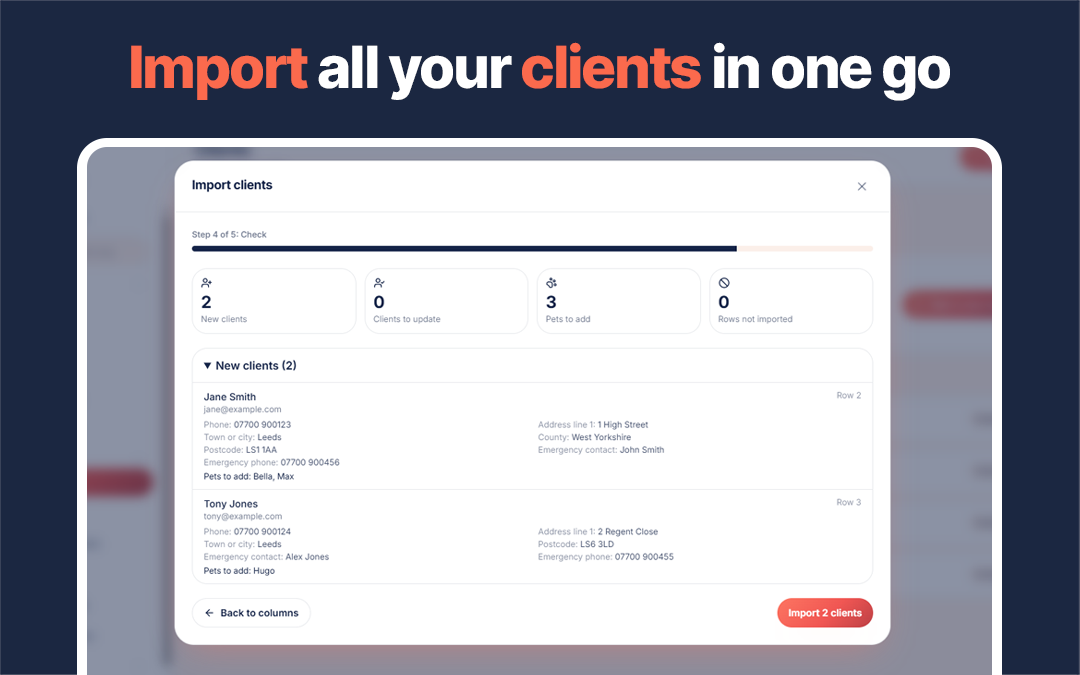
Check every change first
The check step shows every field that will be added or changed, including addresses and emergency contacts. Where a client already exists you see the old value next to the new one.
Undo in one click
Every import is listed with what it changed, and can be undone in one click. Undo only removes clients and pets that have not been used since, and only restores details you have not edited, so nothing you rely on is lost.
Help if you need it
If you have fewer than five clients, PawLoop points you to the import from your client list. You can also ask us to set things up for you. Plan client limits are respected during the import.
Billing, expenses and money
Fix all flagged bookings
In the Billing hub, bookings marked as paid but never invoiced are flagged. Fix all now creates one paid invoice per client for everything flagged, shows you each client's count and total first, and does not email anyone.
Scan your receipts
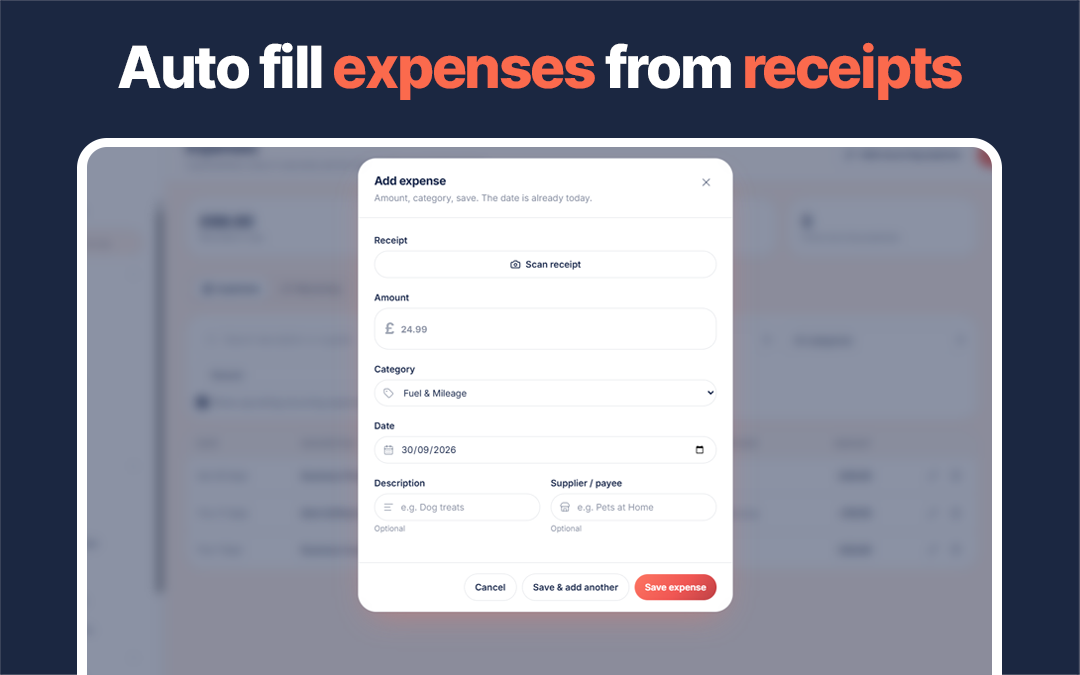
When adding an expense, take a photo of the receipt or upload a PDF and PawLoop fills in the supplier, date, amount and description for you to check.
Accounting exports
Export your invoices, payments and expenses in a format ready for Xero, FreeAgent or QuickBooks, or as a general spreadsheet for your accountant. This is in early access while we gather feedback.
Payouts and invoice views
Owners now get an email when a card payout is on its way, showing the bank account it is going to, and pending payouts are counted in your balance. You can also see when a client has opened an invoice.
Set up and find your way around
A new setup tool
A guided setup tool in Settings walks you through your services, plan options and client portal, so a new account is ready to use without hunting through menus.
Choose your start page
Under Your account, pick the page PawLoop opens on after you sign in: Dashboard, Calendar, Boarding, Clients, Pets or Billing hub. Each person in your team can choose their own.
Tidier menus and settings
The Schedule, Clients, Money and Business menus have been reordered, Payments is now called Billing hub, and dark mode can be switched on from the menu. Settings are grouped into collapsible sections so they are easier to scan.
Keeping clients in the loop
See who got each message
In the notification centre, the Sent tab lists the clients each message went to, with links to their profiles, a client filter and a preview of the message itself.
Messages on the client profile
A client's Communications tab now links custom messages straight back to the Sent tab, so you can see the whole send.
Links that look like your business
When you share an invoice, onboarding or portal link, the preview shows your business name and a friendly pet image rather than PawLoop branding. Client portal settings are hidden when the portal is switched off.
Sign-up and the PawLoop apps
Smoother sign-up
On phones, the Continue button now stays fixed at the bottom of the screen once a step is complete. Signing up with Google keeps your answers, even if Google finishes in a different browser.
PawLoop Walkers app
The PawLoop Walkers app for team members now appears on the dashboard, and our privacy policy has been updated to cover it.
Announcements and roadmap
Announcements
The announcements page has a cleaner layout and each post has its own page for the full details.
Roadmap
Roadmap items can now show an on-hold label with a short reason, without moving them out of their category, and there are more icons to make items easier to spot.
More next week. If there is something you would like to see in PawLoop, get in touch through the chat or email hello@pawloophq.com.
Create free account. No card required →Create your free PawLoop account today.
Sign up in minutes and try every feature free. PawLoop starts with a 14-day free trial. Every feature included and no payment card required to sign up. Choose a plan when your trial ends.
Start free trialNo spam. No card. Just a free pass to try PawLoop.